01
Fixture Control
Patch fixtures from built-in or imported GDTF profiles, then work with intensity, color, position, beam and multi-segment parameters through fixture-aware controls.


Release v14.1.0
Software verification checks passed
DMX-512 · 128 Universes I/O · 3D Visualizer · Offline
DMXpressions™ brings fixture control, lighting programming, cues, playback, effects, Vellum-2D stage planning and StageCraft3D visualization into one professional DMX-512 platform.
No credit card · Best in current Chrome / Edge · Free demo mode forever
DMXpressions™ is professional lighting control software designed around DMX-512 and modern theatrical, stage and live-event workflows. It connects patching, fixture programming, cues, playback, timelines, visualization and output monitoring in one independent environment.
Built for lighting programmers, designers, stage technicians, production teams, venues, houses of worship, schools, independent operators and event-lighting crews—from preparation through live playback.
Explore the complete feature setONE PATCH · ONE SHOW STATE · CONNECTED OPERATOR WORKSPACES
02 / Patch to parameter
Work from fixture personality and stage intent down to the final DMX value without separating programming from the actual rig.
Patch fixtures from built-in or imported GDTF profiles, then work with intensity, color, position, beam and multi-segment parameters through fixture-aware controls.
Assign addresses, validate footprints and organize output from a single universe through larger Art-Net and sACN systems using the local bridge.
Build groups, palettes, presets and effects while retaining direct access to the channel and parameter values that drive the rig.
03 / From intent to go
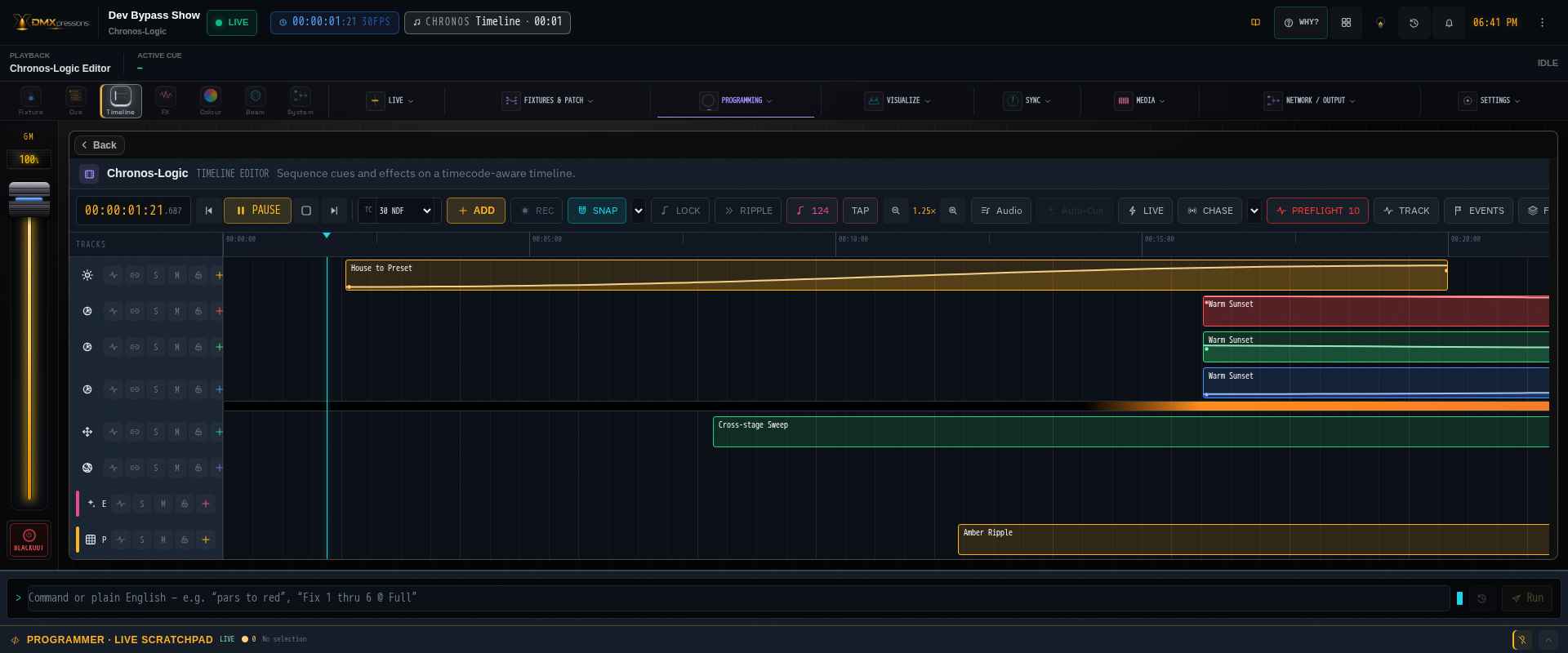
Create cue stacks with timing, tracking, labels and repeatable playback behavior.
Run cues, scenes, faders and manual overrides from focused operator surfaces.
Coordinate lighting with Chronos timelines, MIDI, OSC and SMPTE timecode.
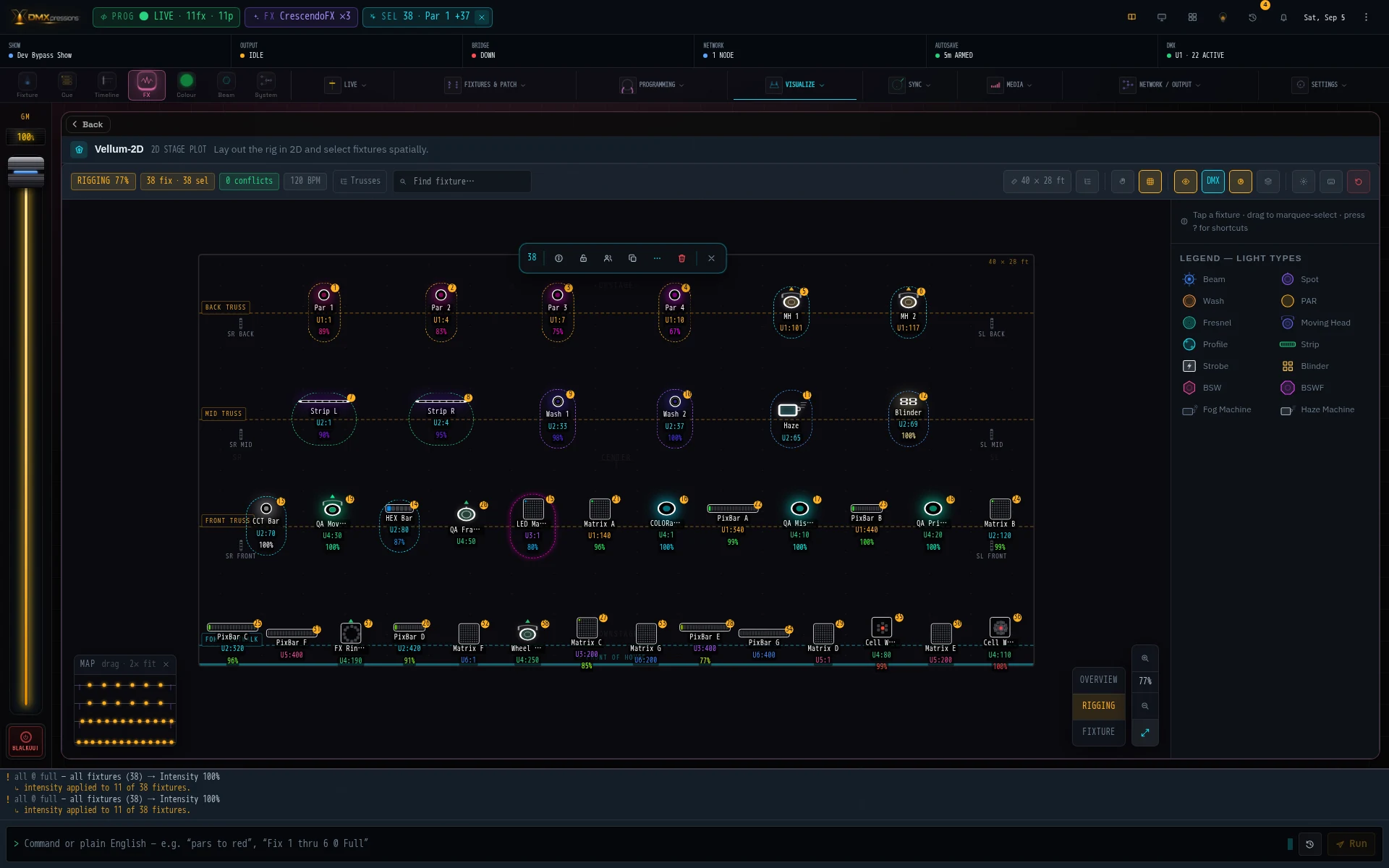
Vellum-2D turns the working patch into a scalable overhead stage plan for placing fixtures, organizing trusses and booms, selecting the rig spatially and preparing crew-ready paperwork.
Move from truss-level overview to rigging addresses and fixture detail, then select, align, distribute, rotate, group or inspect units directly from the plan.
Generate printable plots with fixture symbols, unit numbers, universe-address labels, a symbol key and numbered Instrument Schedule.
Connect compatible DMX interfaces and network nodes, inspect devices through supported RDM workflows, map physical controls and synchronize external systems.
Focused tools stay connected through one patch and show state, so a programmer can move from preparation to live operation without rebuilding information between disconnected applications.
For theatrical programmers, designers, technicians, venues, production teams, educators, independent operators, houses of worship and event-lighting crews.
The Toolkit
A native WebGPU render engine with real-time volumetric beams, fixture-aware photometric falloff, haze and fog, gobo wheels, framing shutters and prisms — driven by the same patched profiles and live DMX values as the console.
Patch a hazer, fogger, snow, bubble or CO₂ machine and watch it simulate real airflow, drift and density — auto-mirrored straight from your DMX patch.
Make the rig move to live sound — beat-, band- and energy-reactive effects driven by any audio input.
Describe a look in plain language and generate full scenes, color palettes and cues in seconds.
Sculpt beam shape, focus and framing, then morph any parameter across the rig with organic, hand-tuned curves.
Inspect any patched fixture in 3D with its manufacturer GDTF geometry, channel map, health grade, live controls and pan/tilt tests in one workspace.
Full DMX-512
Frame-accurate output to any fixture.
128 Universes I/O
Art-Net & sACN through the local bridge.
Cloud Sync · Offline
Your shows follow you everywhere.
MIDI · OSC · Timecode
Trigger or lock to SMPTE / audio.
DMXpressions™ models haze, fog, snow and bubbles as a physics-aware medium, including airflow, density and drift. The same state can be previewed volumetrically in 3D and used to control compatible foggers, hazers and fans.
Density, coverage, height, drift & airflow as a playable instrument — haze, fog, low-fog, snow & bubbles.
Raymarched haze/fog with scattering beams and GPU snow & bubble particles, advected by your airflow.
One-tap atmospheric formulas plus a closed-loop PID that can maintain a target density throughout the show.
Sequence cinematic blocks — “Storm Front,” snowfall, turbulence bursts — into timeline-driven stories.
See It In Action
Every image below is a fresh capture from the working DMXpressions™ app with its demo show and patched fixtures — no interface mockups.


On Any Device


How It Works
01
Free to start. The demo console opens immediately — no install, no driver.
02
Patch fixtures, program cues, and design looks in the full web console.
03
Use compatible USB-DMX in Chrome or Edge, or run the local bridge for Art-Net and sACN.
Why DMXpressions™
ETC Nomad, Onyx and QLC+ are powerful desktop tools. DMXpressions™ takes a different approach: a real DMX-512 console in a browser, with an optional local bridge for Art-Net and sACN output when the show network needs it.
The complete console opens in a browser with no core app installer or hardware dongle. Add the small local bridge only when the browser needs to send Art-Net or sACN over the show network.
Program from the booth, the house, or the wings — on a laptop, tablet or phone. Your show syncs to the cloud and follows you between devices.
Buy the universes you need and keep them forever — no annual subscription, no per-seat fees. Upgrade later and only pay the difference.
High-level workflow comparison based on publicly available product information, reviewed June 2026. “Partial” can include platform limits, optional hardware or paid add-ons. Verify current vendor specifications before purchasing. ETC Nomad, Obsidian Onyx and QLC+ are trademarks of their respective owners and are not affiliated with DMXpressions™.
FAQ

Open the console for free, program your show, and go live when you're ready.